
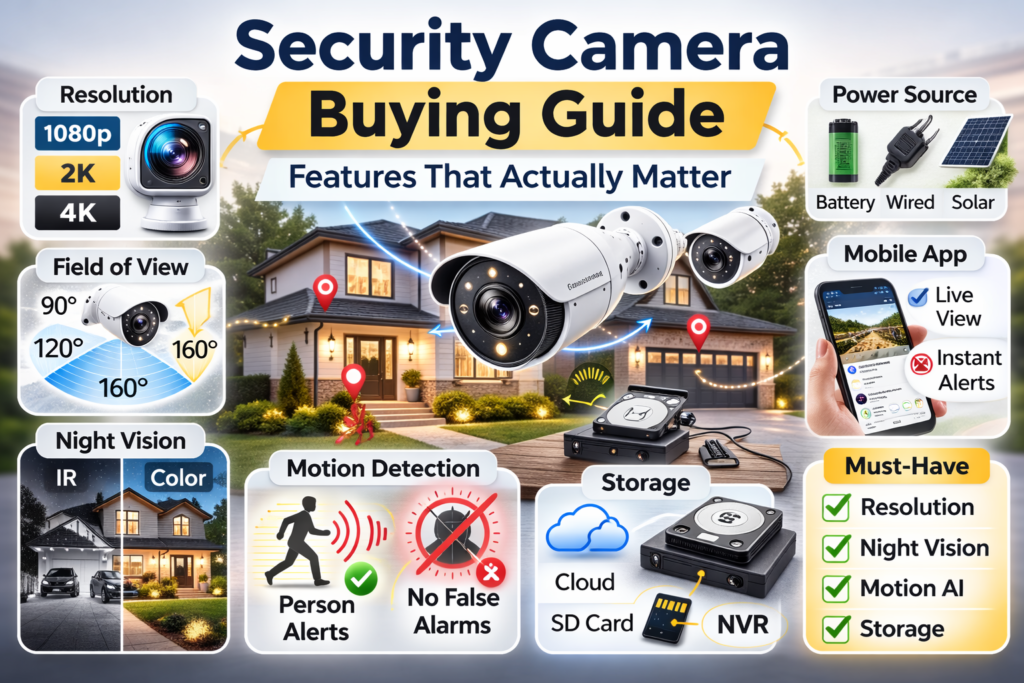
When you decide to protect your home, the first thing you likely do is head to a hardware store or browse online. Almost immediately, you are hit with a wall of technical jargon, flashy packaging, and endless specifications. It is incredibly easy to feel overwhelmed by the choices available.
Many people spend hours comparing different brands and counting megapixels when buying cameras. They assume that the highest numbers on the box equate to the best possible protection for their family. However, those specific numbers are rarely the most important factors in real-world situations.
Marketing materials are designed to sell you the most expensive model on the shelf. They use impressive-sounding terms to make you feel like you are missing out if you do not buy the top tier. This security camera buying guide is designed to help you cut through that confusing noise and understand what truly matters.
💡 The Golden Rule of Home Security
“The best security camera is not the one with the most features — it is the one with the right features for your home and daily routine.”
By the end of this article, you will know exactly how to evaluate a camera based on how you actually live. You might even find yourself re-evaluating exactly determining how many cameras a house needs once you understand what each type can actually do.
📺 Resolution in Our Security Camera Buying Guide (1080p vs 2K vs 4K)
Resolution refers to the number of individual dots, or pixels, that make up the video image. The higher the resolution, the clearer and sharper the picture will theoretically be.
Because we are used to buying 4K televisions, many homeowners assume they also need 4K security cameras. In reality, 4K is often completely unnecessary for standard home protection. While the picture is undeniably crisp, those extra pixels come with significant hidden costs for your home network.
A 4K camera uses massive amounts of internet bandwidth to send video to your phone. If you have several of these cameras running at once, they can drastically slow down your home Wi-Fi. Additionally, these large video files take up a tremendous amount of storage space, meaning your memory cards or cloud storage limits will fill up much faster.
The secret to choosing resolution is understanding the difference between identification and monitoring.
- Identification: Requires sharp detail to recognize faces, read name tags, or see license plates.
- General Monitoring: Requires just enough detail to see broad movements, shapes, and general activity.
Quick Resolution Comparison
| Resolution Level | Best Used For | Wi-Fi Bandwidth Impact | Storage Space Required |
| 1080p (Standard HD) | Backyards, side gardens, indoor rooms | Low | Low |
| 2K (Quad HD) | Front doors, driveways, primary entryways | Medium | Medium |
| 4K (Ultra HD) | Commercial properties, very long driveways | High | High |
A Practical Example: Think about your front door versus your backyard. At the front door, you want to clearly identify the face of a delivery driver or a visitor, so a 2K camera is an excellent choice. However, if you are just watching your backyard to see if the kids are playing or the dog is digging, a standard 1080p camera is perfectly fine and saves you money.
👁️ Field of View (Camera Angle)
The field of view is simply the measured angle of how wide the camera can “see.” This specification is usually listed in degrees. The field of view determines how much of your property fits into the frame at any given time.
While it sounds great to capture as much of your yard as possible, wider is not always better. Ultra-wide lenses create a “fish-eye” effect, causing straight porch columns to look curved and distorting the edges of the video. More importantly, because an ultra-wide lens squeezes a massive area into a small screen, objects in the center of the frame will appear much further away than they actually are.
You should match the field of view to the specific space you are monitoring:
- 90° (Narrow View): Focuses directly on what is in front of it. Perfect for narrow spaces.
- 120° (Medium-Wide View): A standard angle that easily captures a typical driveway or patio.
- 160°+ (Ultra-Wide View): Captures massive areas, often an entire front yard from a single corner.
A Practical Example: Wide areas, like an open backyard or a large driveway, benefit from a 120° or 140° angle to catch activity happening on the edges of the property. Conversely, if you are placing a camera in a narrow hallway, a side alley, or pointing it directly down a walkway, a narrower 90° angle is much better. It prevents the camera from wasting its focus on the brick walls beside the walkway and keeps the person approaching looking appropriately sized.
🌙 Night Vision
Most security incidents and property concerns happen after the sun goes down, making night vision a critical feature.
There are two main types of night vision to look out for:
- Infrared (IR) Night Vision: The camera projects invisible infrared light and reads the reflection, providing a clear black-and-white image even in total darkness.
- Color Night Vision: Instead of invisible light, these cameras turn on a bright, visible LED spotlight when they detect motion. This allows the sensor to capture full-color video, which is incredibly helpful for identifying the color of a vehicle or a piece of clothing.
When evaluating night vision, the detection distance matters far more than the megapixel count. If a camera boasts 4K resolution but its infrared lights only illuminate 10 feet into the dark, it is entirely useless for monitoring a large yard. You need to check the manufacturer’s stated night vision range to ensure it covers the area you intend to watch.
A Practical Example: A camera pointed down a long, dark driveway needs powerful infrared night vision with a range of at least 30 to 40 feet to be effective. However, for an indoor hallway or a small, enclosed porch, a short-range infrared camera is perfect. Using a bright spotlight camera in an indoor hallway would be blinding to anyone waking up for a glass of water.
🧠 Motion Detection & Smart Alerts
Motion detection is arguably the most important feature of any modern security system. However, not all motion detection is created equal.
Basic motion detection simply looks for changes in the video pixels. Unfortunately, this means a swaying tree branch, a passing car’s headlights, or a bug flying past the lens will trigger an alert on your phone.
To solve this, modern cameras use smart alerts and artificial intelligence. Instead of just looking for moving pixels, the camera is trained to recognize specific shapes.
- Person Detection: Alerts you only when a human walks into the frame, ignoring the wind and neighborhood cats.
- Package Detection: Specifically looks for boxes being left on your porch.
- Vehicle Detection: Alerts you only when a car pulls into the driveway, ignoring people walking on the sidewalk.
The reason smart alerts are so vital is because of false alarms. If your phone buzzes thirty times a day because the wind is blowing your front yard bushes, you will eventually stop checking the notifications. This “notification fatigue” entirely defeats the purpose of having a security camera.
Good motion detection matters more than video quality. A crystal-clear 4K camera is absolutely useless if you ignore its alerts because it cries wolf all day long. A slightly lower resolution camera with excellent person detection will keep your home much safer because you will actually check your phone when it tells you someone is there.
💾 Storage Type
Once your camera records a video, it needs a place to save it. You generally have three main options, and choosing between them usually comes down to deciding between a subscription vs local storage.
The Three Ways to Store Footage
- Cloud Storage: The camera sends the video over your Wi-Fi to a secure server on the internet. You can view the footage from anywhere, and the video is safe even if the camera is stolen. (Usually requires a monthly subscription fee).
- Local SD Card Storage: Video is saved to a memory card inserted directly into the camera. It is a great choice for privacy, as video never leaves your property. However, if the camera is destroyed or stolen, your evidence disappears with it. (One-time purchase).
- NVR (Network Video Recorder): A dedicated hard drive box that sits inside your house, connected to the cameras. NVR systems offer massive storage, allowing you to record continuously 24/7 for weeks at a time without relying on the internet. (Higher upfront cost, zero monthly fees).
🔋 Power Source
How a camera gets its power dictates where you can place it and how much maintenance it requires. When comparing wired vs wireless systems in terms of power, you are trading the convenience of a fast setup for the long-term reliability of a maintenance-free system.
- Battery-Powered Cameras: Incredibly popular because they are easy to install. You just screw the mount to the wall and attach the camera. The downside? You have to recharge them. In very cold winter climates, batteries drain significantly faster, which can become a frustrating chore.
- Wired Power Cameras: These plug into a standard electrical outlet or receive power through an Ethernet cable. While installation might require drilling holes, they offer unmatched reliability. You never have to worry about a battery dying while you are on vacation.
- Solar-Powered Cameras: An excellent middle ground. You connect a small solar panel to a battery-powered camera. As long as the panel gets a few hours of direct sunlight each day, it will keep the battery continually topped off.
📱 Mobile App & Notifications
It is a hard truth in the home security world that many camera problems come from poor mobile apps, not poor hardware. You will interact with the app on your phone every single day, while you might only touch the physical camera once a year.
If the app is frustrating to use, your entire experience will be poor. Pay attention to these three software features:
- Notification Delays: If a delivery driver rings your doorbell, but it takes the app fifteen seconds to load the video feed, the driver will be gone by the time you say hello. You want an app that connects to the live view almost instantly.
- Usability: Finding a specific video from three days ago should be simple. If you have to scroll through a messy timeline of hundreds of tiny clips just to find the moment the mail arrived, the app is failing you.
- Family Sharing: Can you easily give your spouse, older children, or a trusted neighbor access to the camera feeds? A good app allows you to grant access to multiple people safely.
🚩 Common Marketing Traps
As you shop, you will encounter several common misunderstandings created by clever marketing. Keep an eye out for these traps so you do not waste your money:
- ❌ “4K is always better”: As we covered earlier, 4K is a massive bandwidth hog and is entirely unnecessary for basic yard monitoring. Do not pay double the price for pixels you do not need.
- ❌ “8x Digital Zoom”: Digital zoom simply means taking the existing video and stretching it out on your screen, which makes it blurry and blocky. It is a software trick, not a hardware feature. Only optical zoom physically magnifies an image without losing quality.
- ❌ “Wire-Free” Confusion: Keep in mind that “wire-free” simply means the camera runs on a battery. It sounds like futuristic technology, but it just means you will eventually have to take it down and charge it.
- ❌ Exaggerated AI Detection: Many cheaper cameras claim to perfectly detect pets, packages, and vehicles. In reality, their software is often unrefined, meaning shadows are flagged as people, and small bushes are flagged as packages. Read independent, real-world reviews before trusting the box.
🏁 Conclusion
Choosing the right security equipment does not have to be a stressful, highly technical process. Ultimately, choosing a security camera is about matching the camera to your home layout and lifestyle, not chasing specifications.
If you live on a busy street, prioritizing smart motion detection will save your sanity. If you hate doing maintenance chores in the winter, prioritizing wired power over batteries will save you a headache. If you want to identify faces at the front door, invest in a higher resolution for that specific spot.
This security camera buying guide was designed to give you the practical knowledge to look past the marketing jargon. Take a walk around your home, note the distances, lighting, and what you actually want to see in each area.
“Once you understand which features matter, selecting a specific camera becomes much easier.”
❓ FAQ
What resolution security camera should I buy?
For areas where you need to identify faces or license plates, like a front porch or a driveway gate, a 2K resolution camera is ideal. For general monitoring of wide areas, like a backyard or a side garden, a standard 1080p camera is completely sufficient and will save you money and internet bandwidth.
Are battery security cameras reliable?
Yes, battery cameras are reliable for everyday monitoring, but they require diligent maintenance. You must remember to recharge them before they die, and you should be aware that extreme cold weather can cause the batteries to drain significantly faster than the manufacturer’s estimates.
Do I need night vision?
Yes, night vision is absolutely essential for outdoor cameras, as most property concerns happen in the dark. Make sure to check the specific “night vision distance” rating on the box to ensure it can see far enough to cover your intended area.